# Folio number not showing for Mirae Asset MF units transferred from SoA to Zerodha demat
**URL:** https://tradingqna.com/t/folio-number-not-showing-for-mirae-asset-mf-units-transferred-from-soa-to-zerodha-demat/198720
**Category:** Coin - Direct MF
**Created:** [October 10, 2026, 12:26pm UTC](https://tradingqna.com/t/folio-number-not-showing-for-mirae-asset-mf-units-transferred-from-soa-to-zerodha-demat/198720 "2026-10-10T12:26:06Z")
**Posts on this page:** 6
**Page:** 1
### Author:  [@devx101](https://tradingqna.com/u/devx101)
#### Post date: [October 10, 2026, 12:26pm UTC](https://tradingqna.com/t/folio-number-not-showing-for-mirae-asset-mf-units-transferred-from-soa-to-zerodha-demat/198720/1 "2026-10-10T12:26:06Z")
Hi team,
I transferred my Mirae Asset mutual fund units from Statement of Account (SoA) form to my Zerodha demat account. The units now show correctly in my demat holdings (CDSL Easi) and the buy average is sorted.
My only issue is that no folio number is displayed against these units. Funds I bought directly on Coin show a folio number.
1. Is the folio number expected to be blank for units transferred in from SoA, since they are now held in demat mode? will there be **any trouble in future**?
2. Is there any way to see or get the original Mirae folio number mapped to these units, for example from CAMS or Mirae, or from Zerodha?
Thanks in advance.
---
### Author:  [@DishantSR](https://tradingqna.com/u/DishantSR)
#### Post date: [October 11, 2026, 4:18am UTC](https://tradingqna.com/t/folio-number-not-showing-for-mirae-asset-mf-units-transferred-from-soa-to-zerodha-demat/198720/2 "2026-10-11T04:18:52Z")
As far as I understand, that’s normal. Once units move from SoA into demat, they’re held against the scheme’s ISIN in your CDSL account, so there’s no folio number for the broker to show. It shouldn’t stop you from redeeming through Coin.
For the original folio, check your old Mirae account statement, or download a detailed CAS from KFintech (Mirae’s registrar) or MF Central. It should show the old folio and the units moving out of it to demat.
The one thing I’d keep safe is the old statement with your original purchase dates and NAVs. Capital gains are calculated from those, so if the tax P&L ever shows a wrong date or cost, that’s your proof to get it corrected.
---
### Author:  [@devx101](https://tradingqna.com/u/devx101)
#### Post date: [October 12, 2026, 5:18am UTC](https://tradingqna.com/t/folio-number-not-showing-for-mirae-asset-mf-units-transferred-from-soa-to-zerodha-demat/198720/3 "2026-10-12T05:18:44Z")
But then why natively created MF Units in COIN have a Folio Number. I have two Liquid MF Funds and they have a Folio Number, they were never transferred from SoA.
I want to know why this issue occurs? Is the old Folio closed permanently in amc side? I cannot seem to login to Mirae’s amc website either with the Old Folio Number.
---
### Author:  [@devx101](https://tradingqna.com/u/devx101)
#### Post date: [October 14, 2026, 4:04am UTC](https://tradingqna.com/t/folio-number-not-showing-for-mirae-asset-mf-units-transferred-from-soa-to-zerodha-demat/198720/4 "2026-10-14T04:04:47Z")
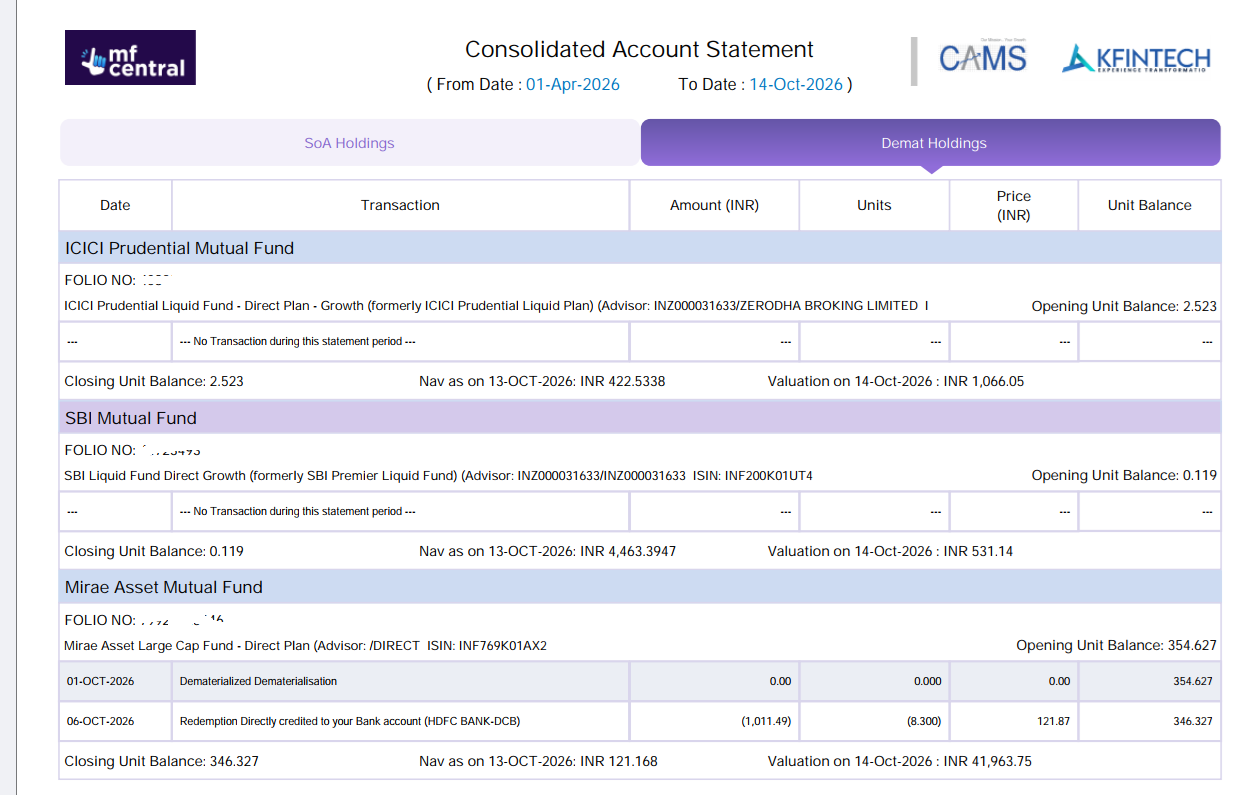
Also, why is the Transferred MF not showing up in MF Central Portal in Demat section. It shows 2 mf’s created natively from COIN but not the Transferred one (mirae) ?
---
### Author:  [@DishantSR](https://tradingqna.com/u/DishantSR)
#### Post date: [October 14, 2026, 4:19am UTC](https://tradingqna.com/t/folio-number-not-showing-for-mirae-asset-mf-units-transferred-from-soa-to-zerodha-demat/198720/5 "2026-10-14T04:19:13Z")
Good questions. Coin orders placed through the AMC’s own system usually still get an RTA folio with the demat flag on it, which is why those show a number. Units you moved from SoA to demat were redeemed out of the old folio and credited to your CDSL account against the ISIN, so the demat holding itself doesn’t carry a folio for Kite to display.
On the old Mirae folio: if all units moved out, it typically shows a nil balance rather than being deleted, which would explain the login trouble. KFintech or Mirae support can confirm its status if you share the folio number and PAN.
On MF Central: its demat view depends on what the depository shares with it, and transferred-in units sometimes show up late or not at all. Your CDSL CAS is the authoritative record, so as long as the Mirae units appear there, you’re fine. I’d still raise a ticket with Mirae/KFintech if you want it mapped on MF Central.
---
### Author:  [@devx101](https://tradingqna.com/u/devx101)
#### Post date: [October 14, 2026, 5:14am UTC](https://tradingqna.com/t/folio-number-not-showing-for-mirae-asset-mf-units-transferred-from-soa-to-zerodha-demat/198720/6 "2026-10-14T05:14:55Z")
ok, I checked again in detail. in MF central if i fetch CAS- **Statement** , the MF is coming in details. See Screenshot below.
But when it comes to **summary** nothing is coming.
I have a feeling that it is due to Discrepant entry as MF Central has no way of knowing invested value/ purchase price. Can someone in Zerodha please take up the matter.
I know everything will come in CDSL-CAS but this small things matter to a lot of Investors who have come from SoA Route. Demat is new, SoA is old, investors have to be comfortable with both the systems- seeing Units in one Statement but not in other adds to confusion.