# Had a question regarding streak scanners
**URL:** https://tradingqna.com/t/had-a-question-regarding-streak-scanners/196283
**Category:** Streak - backtesting
**Created:** [July 24, 2026, 11:21am UTC](https://tradingqna.com/t/had-a-question-regarding-streak-scanners/196283 "2026-07-24T11:21:00Z")
**Posts on this page:** 2
**Page:** 1
### Author:  [@Stock\_Freak](https://tradingqna.com/u/Stock_Freak)
#### Post date: [July 24, 2026, 11:21am UTC](https://tradingqna.com/t/had-a-question-regarding-streak-scanners/196283/1 "2026-07-24T11:21:00Z")
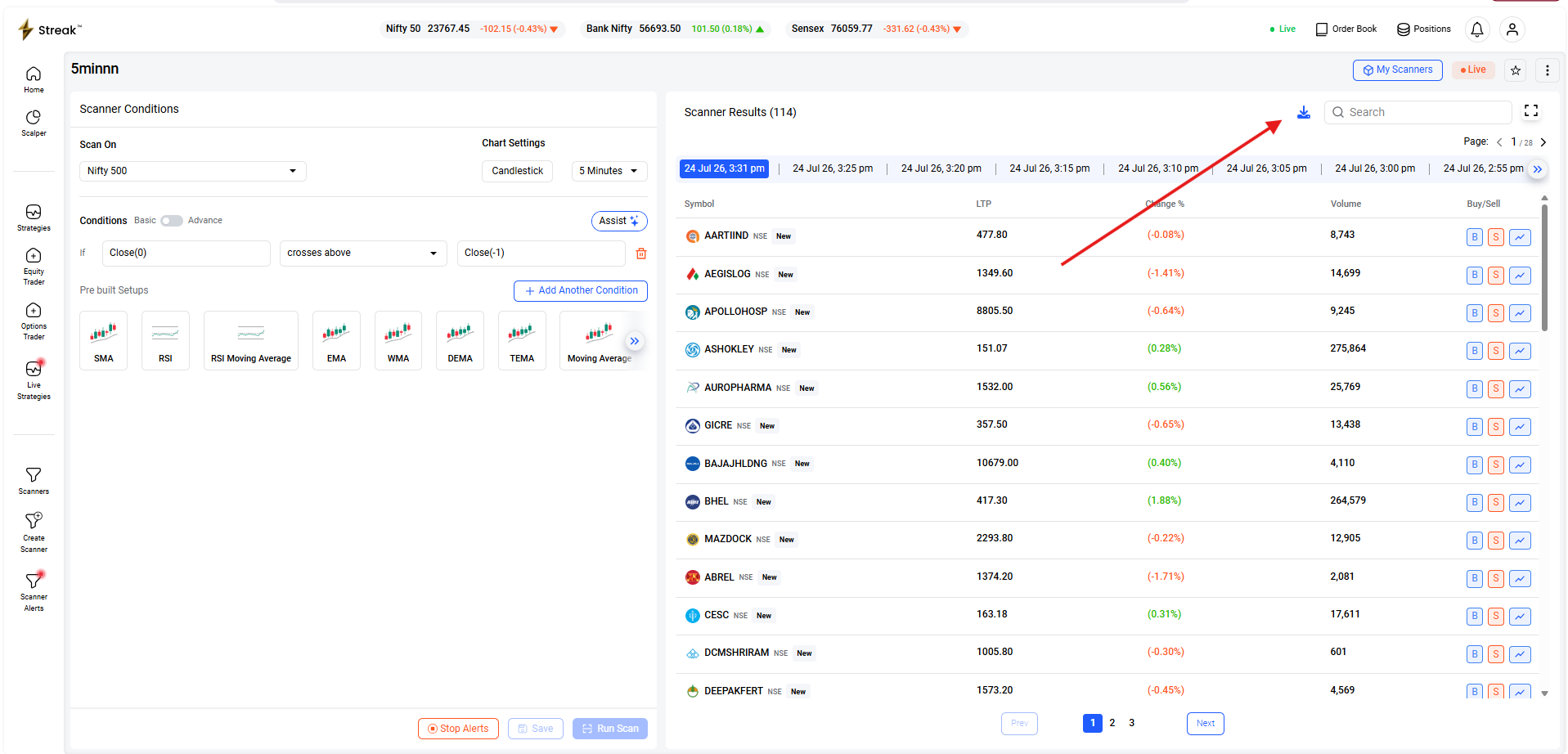
can anyone guide me on how to download the results for the scanners I’m a bit confused with the process.
---
### Author:  [@BERUS](https://tradingqna.com/u/BERUS)
#### Post date: [July 24, 2026, 11:30am UTC](https://tradingqna.com/t/had-a-question-regarding-streak-scanners/196283/2 "2026-07-24T11:30:11Z")
Once you open your desired scanner you can see on the top right an option to download the scan results