Many times I have happened to place MIS orders by mistake. It is worst when it happens close to square off cut off time. Something must be done here.
Anyone else experienced the same frustration?
What is the brokerage and other charges for MIS ?
Did you place an MIS order by mistake while you actually intended to place a CNC order?
Well, if this is the case, then there is an option to convert this position from MIS to CNC and vice-versa. This option is available on the positions page at the end of each position with a ‘>’ sign

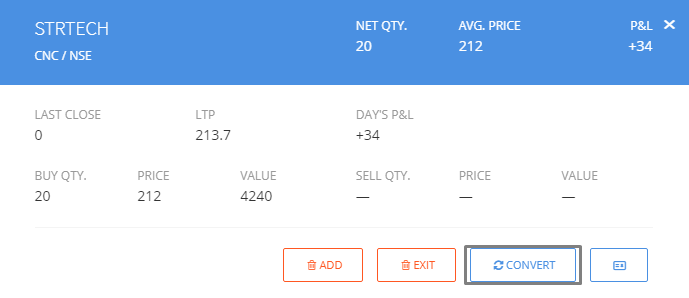
If you ended up with an MIS position by complete accident, then ideally you should immediately square off your open position. The charges for Equity intraday trades are available in the Charge List.
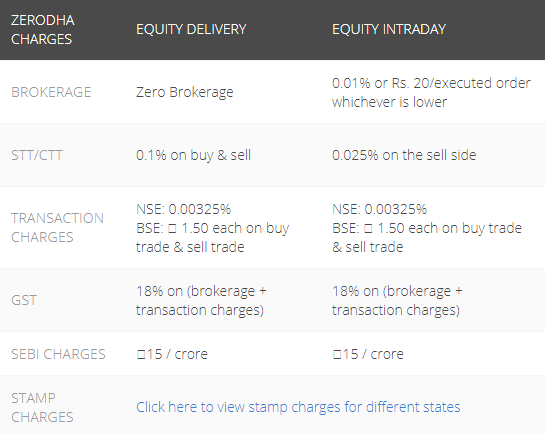
3 Likes
I know about this option but this time I happened to place it just couple of secs before square of time. I tried to convert but got some error message saying something like ‘…locked of square off…’.
Well, I would urge you to be more mindful of the product type in which you are placing orders, especially when these orders are placed very close to auto square-off time. I’m assuming this is just a one-off incident. Do let us know if we can help you in any way.
1 Like
Well, there are times we want to quickly place an order and it is very easy for this to happen. Also, if one order by mistake goes into MIS all the subsequent orders default as MIS till we observe and change to CNC.
How about changing the color of the pop-up window for MIS ? Similar to like blue for buy, orange for sell.
This is the Kite Buy order window.
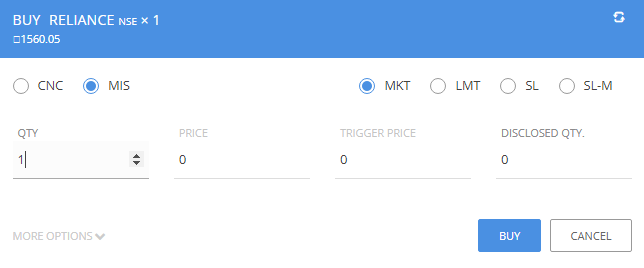
If the last order you placed was an MIS Market order, then Kite will remember this for you. The product type will be selected as MIS and the order type will be selected as Market order the next time you load the Buy order window.
The position conversion option is in place for scenarios like this.
How do you suggest this can be done?
I am no UX expert but what comes to mind is this:
Buy - Blue background for top header & buy button (currently existing)
Sell - Orange background for top header & sell button (currently existing)
MIS - Cyan background for the entire row containing Qty, price, trigger price, disclosed qty (proposed)
![image|690x127]
(/uploads/default/original/2X/1/1823af062b567533237725f1260bc85dba3841c4.png)
That way whenever we see the Cyan background appears we would know we are placing an MIS order and not a CNC.
@BharatW Does it make sense?
What if MIS order touches its Circuit limit and I dont square off the order (I cant, As trading for that session has been suspended) then at what price Zerodha will square off ?