Do you mean source code ?
(() => {
“use strict”;
// ── Constants ────────────────────────────────────────────────────────────
const BUTTON_ID       = "zerodha-expand-collapse-btn";
const SELECTORS = {
    section : "section.open-positions",
    header  : "header.data-table-header",
    icons   : "span.expand-icon",
    expanded: "expanded",
};
const COLORS = {
    expand  : "#2e7d32", // green
    collapse: "#c62828", // red
};
const LABELS = {
    expand  : "Expand All",
    collapse: "Collapse All",
};

// ── Helpers ──────────────────────────────────────────────────────────────

/**
 * Applies a plain object of style properties to an element.
 * Avoids inline style strings; keeps styling declarative and easy to diff.
 */
function applyStyles(el, styles) {
    Object.assign(el.style, styles);
}

/** Creates the button with all attributes set via safe DOM APIs (no innerHTML). */
function createButton() {
    const btn = document.createElement("button");
    btn.id          = BUTTON_ID;
    btn.textContent = LABELS.expand;   // textContent — XSS-safe
    btn.setAttribute("aria-pressed", "false");
    btn.setAttribute("title", LABELS.expand);

    applyStyles(btn, {
        marginLeft  : "10px",
        padding     : "3px 8px",
        cursor      : "pointer",
        borderRadius: "4px",
        border      : "none",
        fontWeight  : "500",
        fontSize    : "12px",
        color       : "white",
        background  : COLORS.expand,
        transition  : "background 0.2s ease",
    });

    return btn;
}

/** Syncs button label, colour, and ARIA state to the current expanded flag. */
function syncButton(btn, isExpanded) {
    const label = isExpanded ? LABELS.collapse : LABELS.expand;
    btn.textContent = label;
    btn.setAttribute("aria-pressed", String(isExpanded));
    btn.setAttribute("title", label);
    applyStyles(btn, { background: isExpanded ? COLORS.collapse : COLORS.expand });
}

/**
 * Derives the true expanded state from the DOM.
 * Returns true only if every icon is currently expanded.
 */
function areAllExpanded() {
    const icons = document.querySelectorAll(SELECTORS.icons);
    if (!icons.length) return false;
    return [...icons].every(icon => icon.classList.contains(SELECTORS.expanded));
}

// ── Core logic ───────────────────────────────────────────────────────────

function injectButton() {
    // Idempotency — bail if already injected (handles SPA re-renders)
    if (document.getElementById(BUTTON_ID)) return;

    const section = document.querySelector(SELECTORS.section);
    if (!section) return;

    const header = section.querySelector(SELECTORS.header);
    if (!header) return;

    const btn = createButton();

    btn.addEventListener("click", () => {
        try {
            const icons = document.querySelectorAll(SELECTORS.icons);
            if (!icons.length) return;

            // Read actual DOM state — not an internal flag
            const currentlyExpanded = areAllExpanded();

            icons.forEach(icon => {
                const isExpanded = icon.classList.contains(SELECTORS.expanded);
                if (!currentlyExpanded && !isExpanded) icon.click();
                if ( currentlyExpanded &&  isExpanded) icon.click();
            });

            // Disable during settle window — prevents double-click race condition
            btn.disabled = true;

            // Defer DOM read — Zerodha updates classes asynchronously after icon.click()
            setTimeout(() => {
                // Guard — button may have been removed if user navigated away
                if (!document.getElementById(BUTTON_ID)) return;
                syncButton(btn, areAllExpanded());
                btn.disabled = false;
            }, 50);
        } catch (err) {
            // Absorb errors so a broken icon never bricks the button
            btn.disabled = false;
            console.warn("[Zerodha Ext] Error toggling positions:", err);
        }
    });

    header.appendChild(btn);

    // Defer injection sync — Zerodha's classes may not have settled on page load
    setTimeout(() => {
        if (!document.getElementById(BUTTON_ID)) return;
        syncButton(btn, areAllExpanded());
    }, 50);

    // Button is live — stop watching for it
    domObserver.disconnect();

    // Watch only the header for button removal (SPA navigation away)
    // When removed, restart the main observer to wait for it again
    removalObserver.observe(header, { childList: true });
}

// ── Observers ────────────────────────────────────────────────────────────

// Watches for the button being removed from the DOM (user navigated away)
const removalObserver = new MutationObserver((mutations) => {
    const removed = mutations.some(m =>
        [...m.removedNodes].some(node => node.id === BUTTON_ID)
    );
    if (removed) {
        removalObserver.disconnect();
        // Resume watching for the section to reappear
        domObserver.observe(document.body, { childList: true, subtree: true });
    }
});

// Watches for the positions section to appear, then injects the button
const domObserver = new MutationObserver(() => {
    if (!window.location.pathname.includes("positions")) return;
    injectButton();
});

domObserver.observe(document.body, {
    childList: true,
    subtree  : true,
});

// Also attempt immediately in case the DOM is already ready
injectButton();
})();
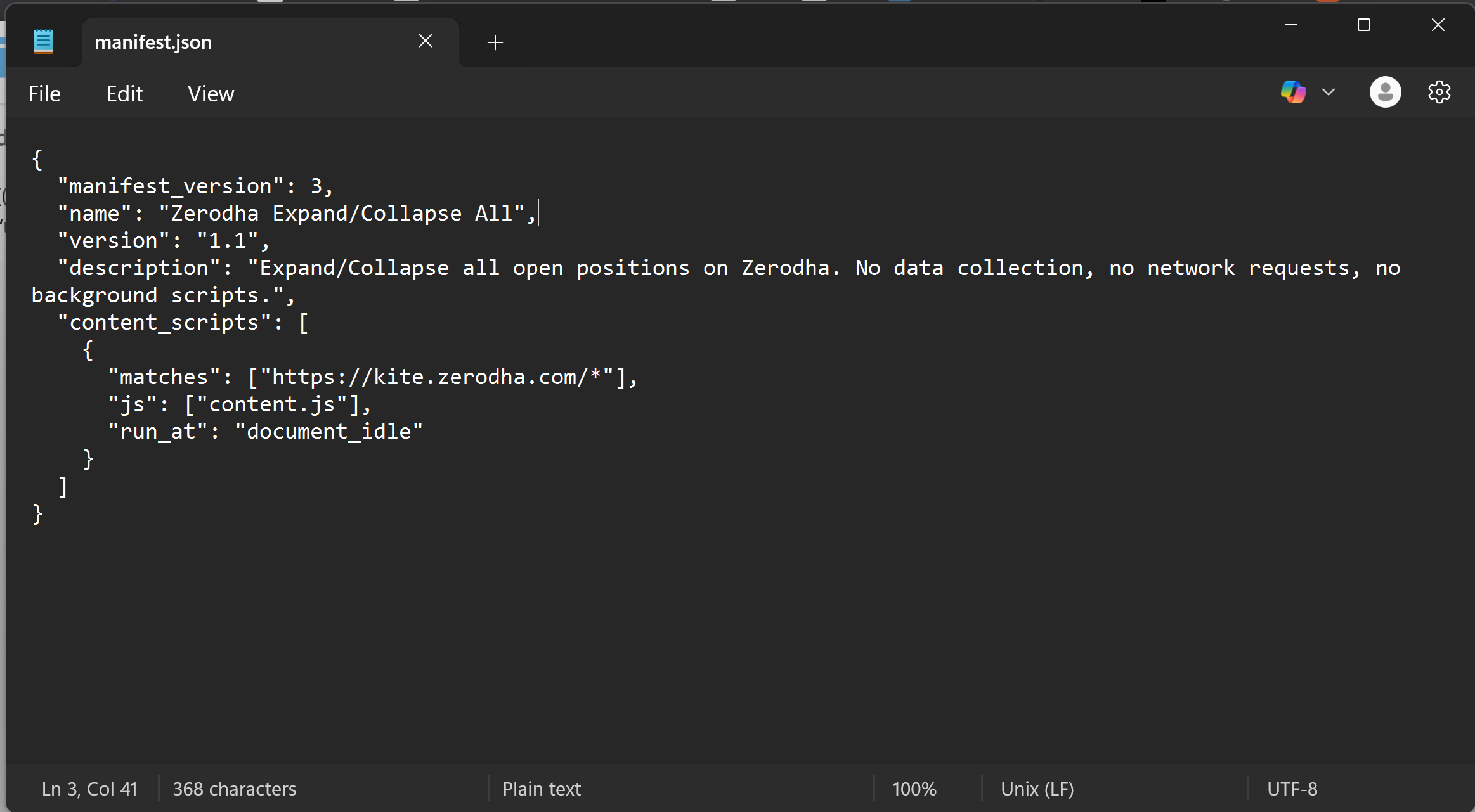
Yeah… You said you can examine every line of source. Right? How do end users do that? Did you put the code in Github?
We’re excited to announce that position grouping, which is already available on the web, is now live on the Kite app as well.
Position Grouping
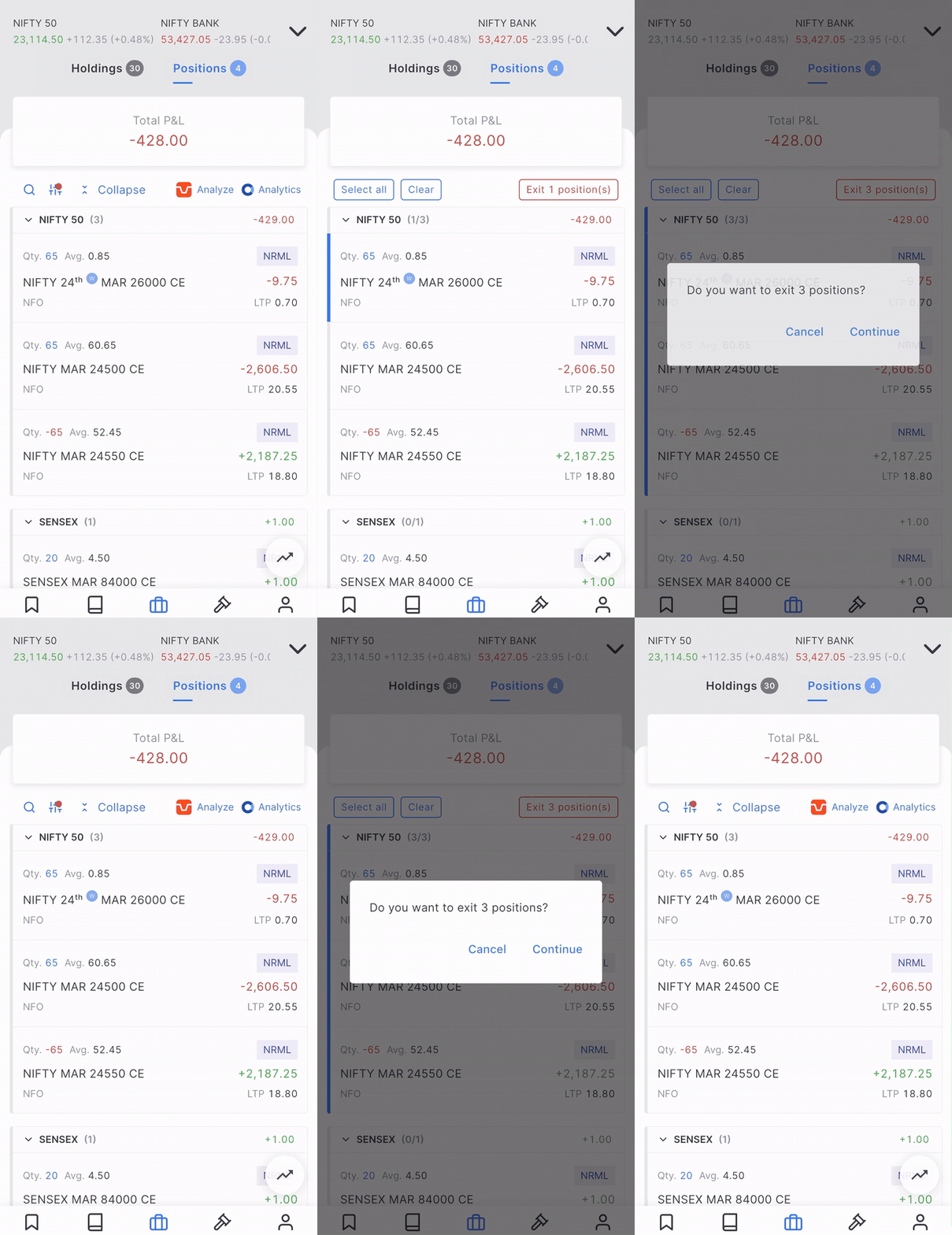
- Positions can now be grouped by None, Underlying, or Underlying & Expiry. Tapping the Group option automatically groups positions by their underlying. To switch grouping modes or turn off grouping entirely, tap the settings icon at the top and select the preferred option.
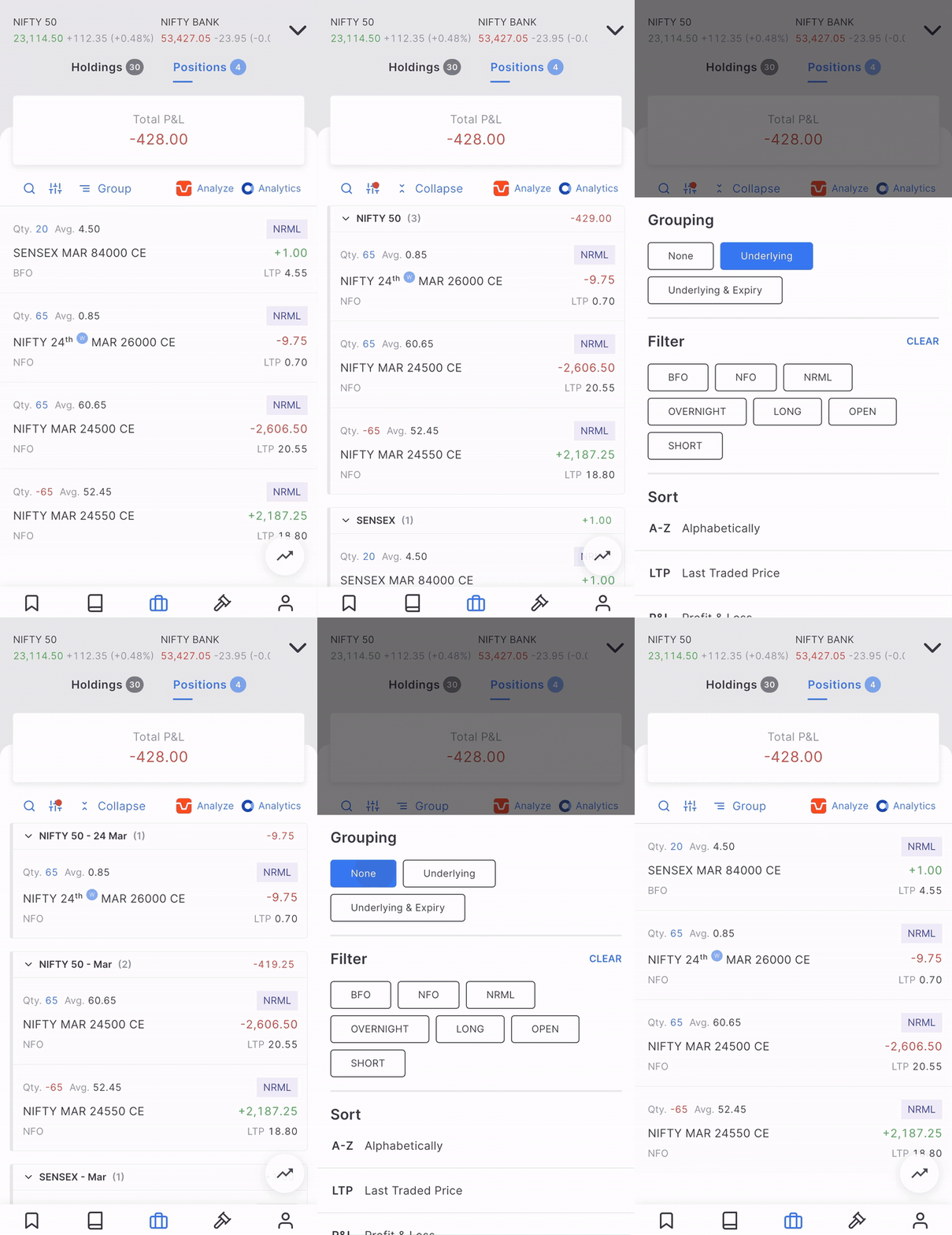
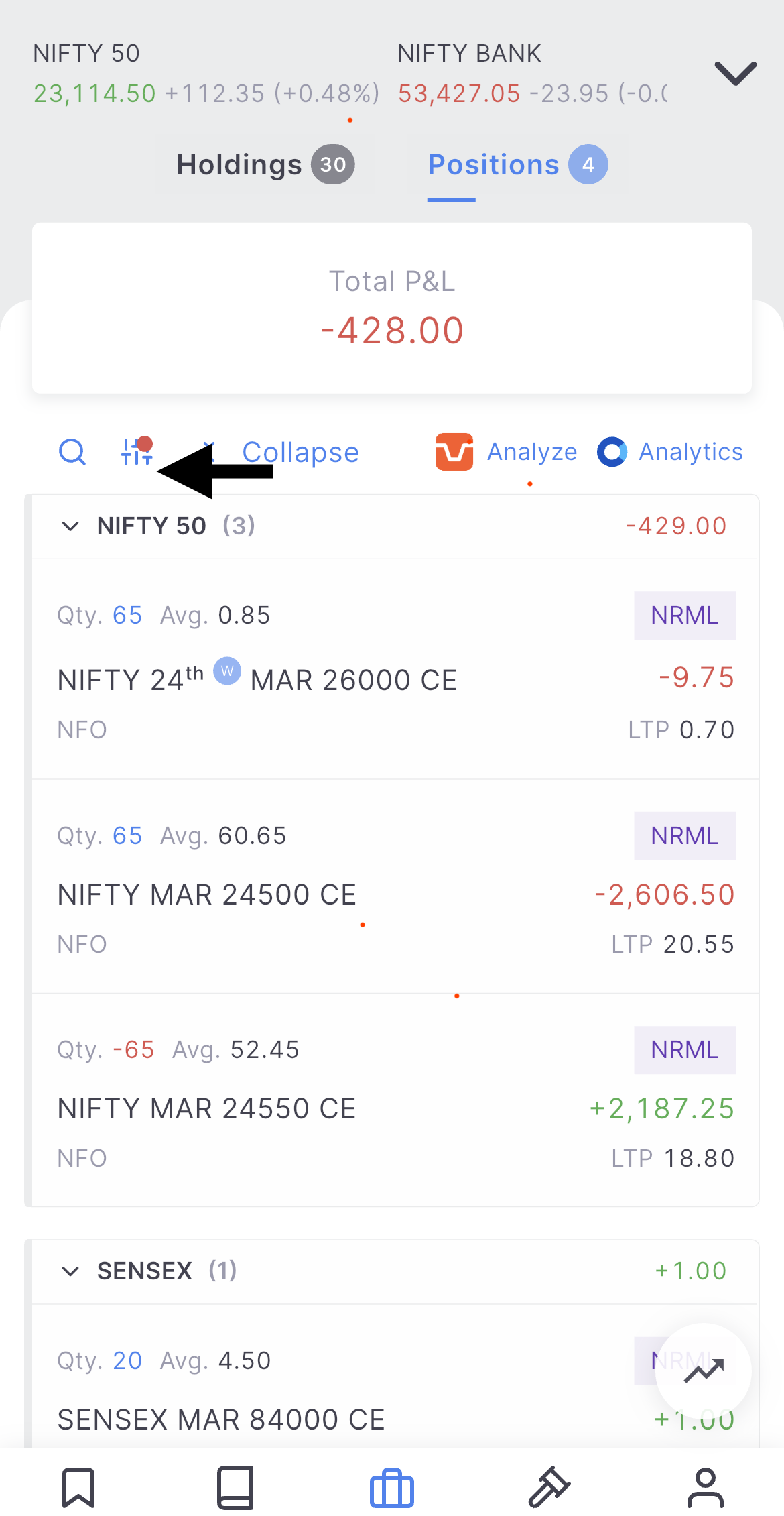
- A red indicator at the top signals when grouping or a filter is active.
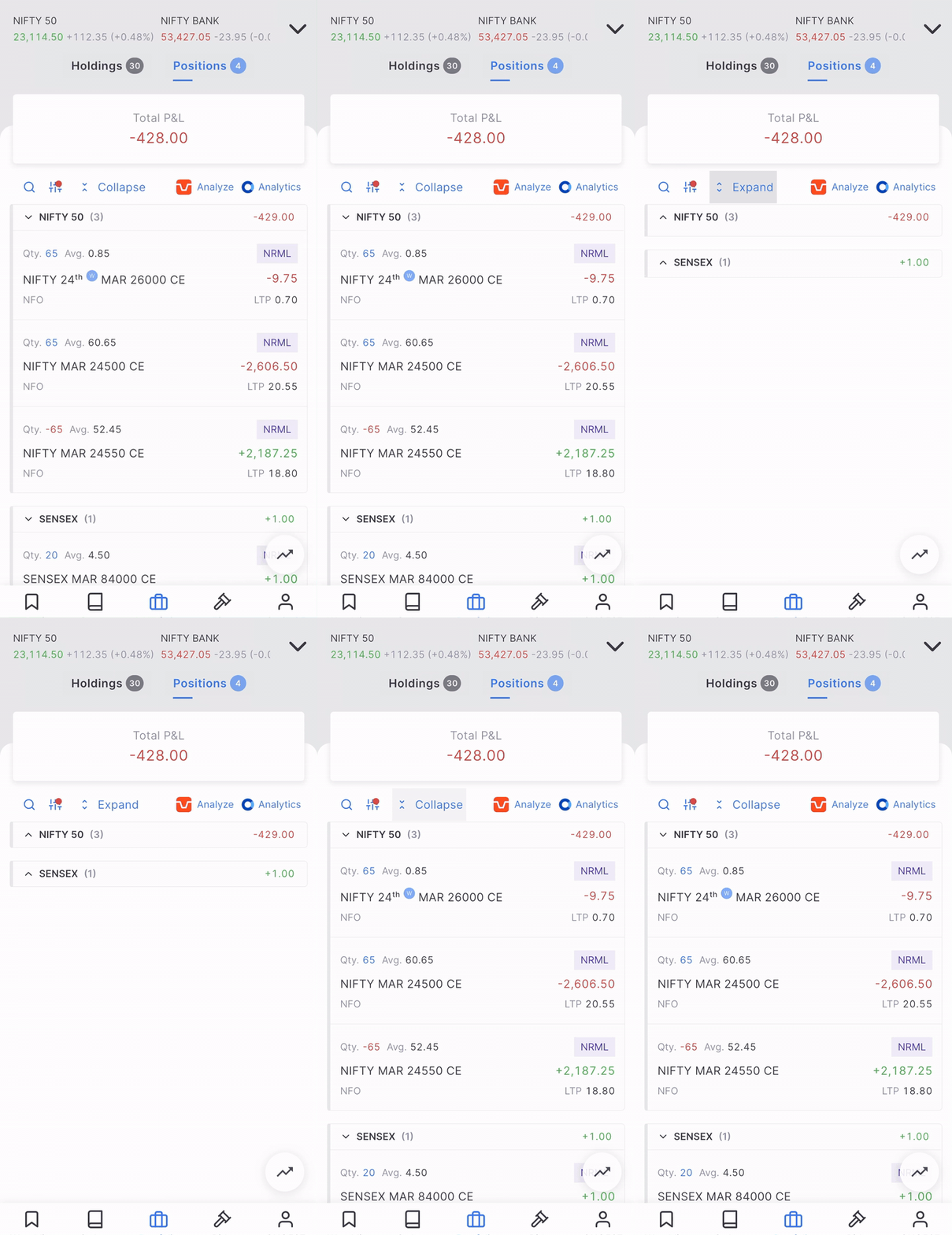
- Individual groups can be collapsed or expanded by tapping the group name; it’s useful for focusing on specific positions. There’s also a Collapse/Expand All button at the top to manage all groups at once.
- Similar to the web, grouping is remembered until the user manually logs out of the app, and relogging will lead to a reset of the applied grouping. While the filter is reset the next day.
Multi-Selection & Exit
Multi-selection has been significantly reworked. Previously, a long press would open a separate page for selecting positions, making it impossible to track P&L during the process. Now, multi-selection happens directly on the positions page, allowing P&L to be tracked in real time while selecting. Additionally, positions can now be exited group-wise by long-pressing on the group name.
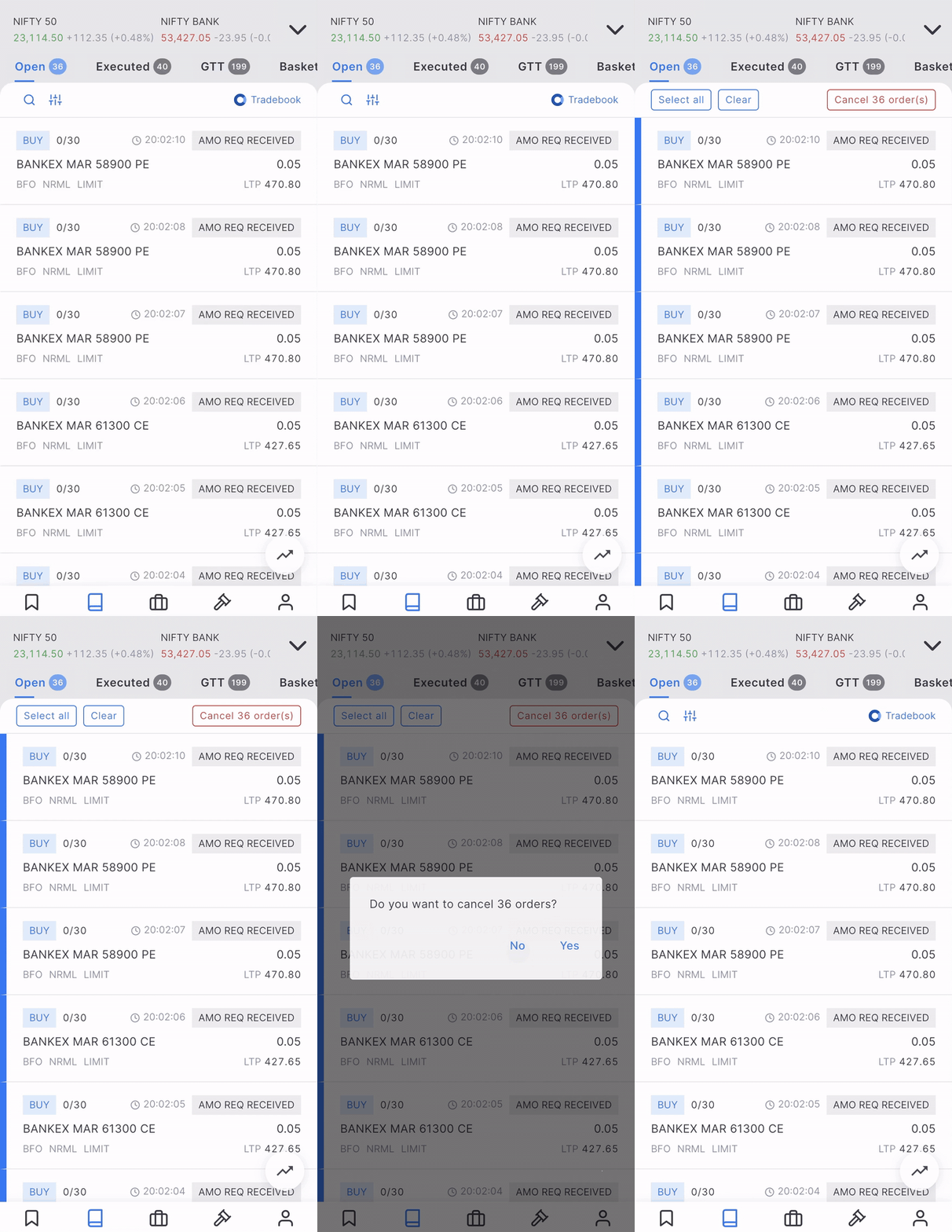
These changes are implemented on the Orderbook, GTT, and Alerts pages as well.
This build also has the Analyze button inside the quick basket, which was available only on the web earlier. The build is currently available in beta and will be rolled out to the live environment in the coming days.

3 Likes
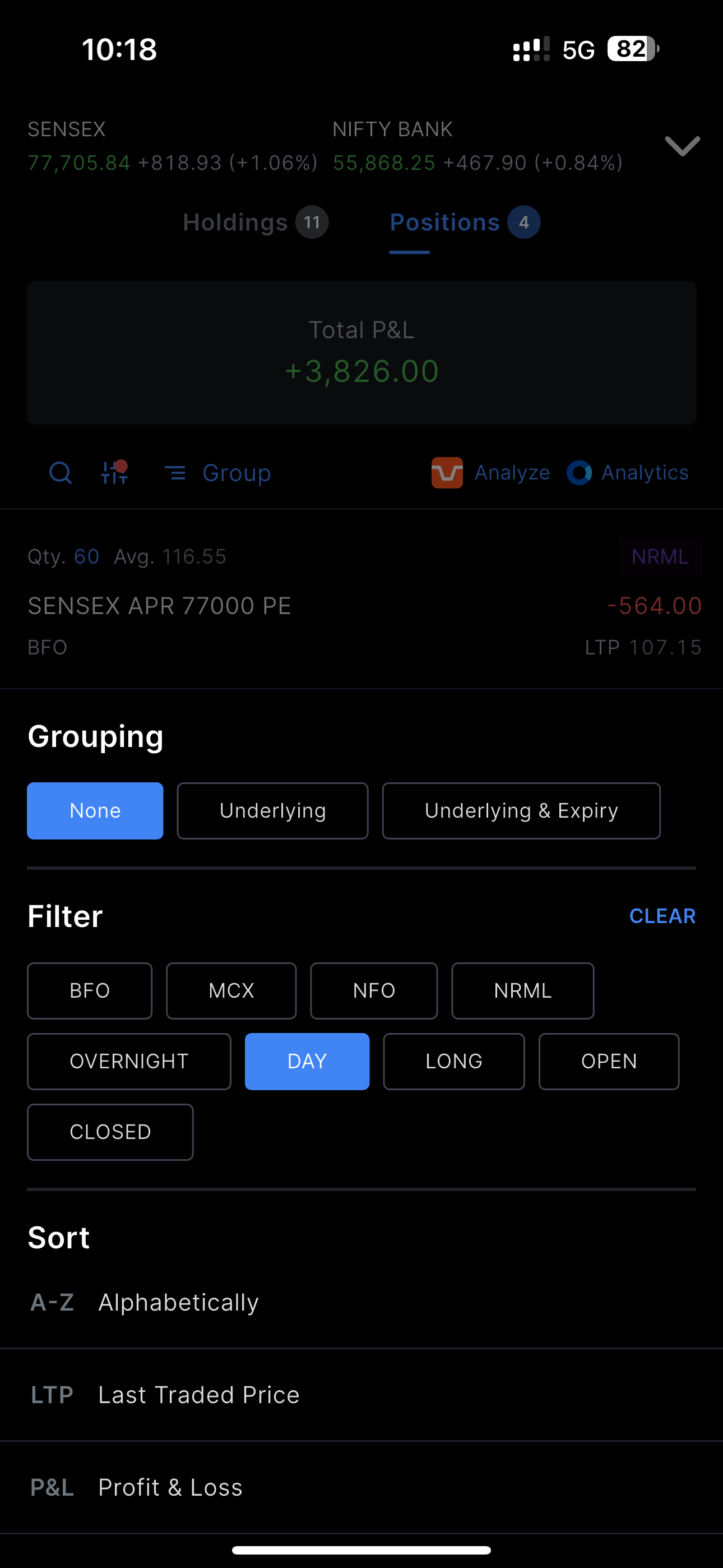
It’s WIP. Should be available in a few days; we are revamping a few things wrt filters.
@DhanushK @Arockiya_Raja , likewise can you bring grouping of holdings based on the industry, marketcap as well? This data is already available on console with colour blocks but if the same data can be brought directly to the holdings where we can see number of holdings in a particular industry or for a given market cap, it will be even more useful especially for the mobile app users.
On our list of things to do, already picked it up.
1 Like
Hope to see it soon on the app.
This is now available on the Kite web.
1 Like
Could you make the selected filter persistent in mobile version ? I’m using iOS
Whenever I select the filter and close the app and when I open app again it resets to its default state.
Next. Alerts based on P&L.
alerts on whatsapp is possible ?
Following up on the filter request:
- Filtering between CE, PE and FUT on kite. Right now they’re all clubbed under NFO. Also
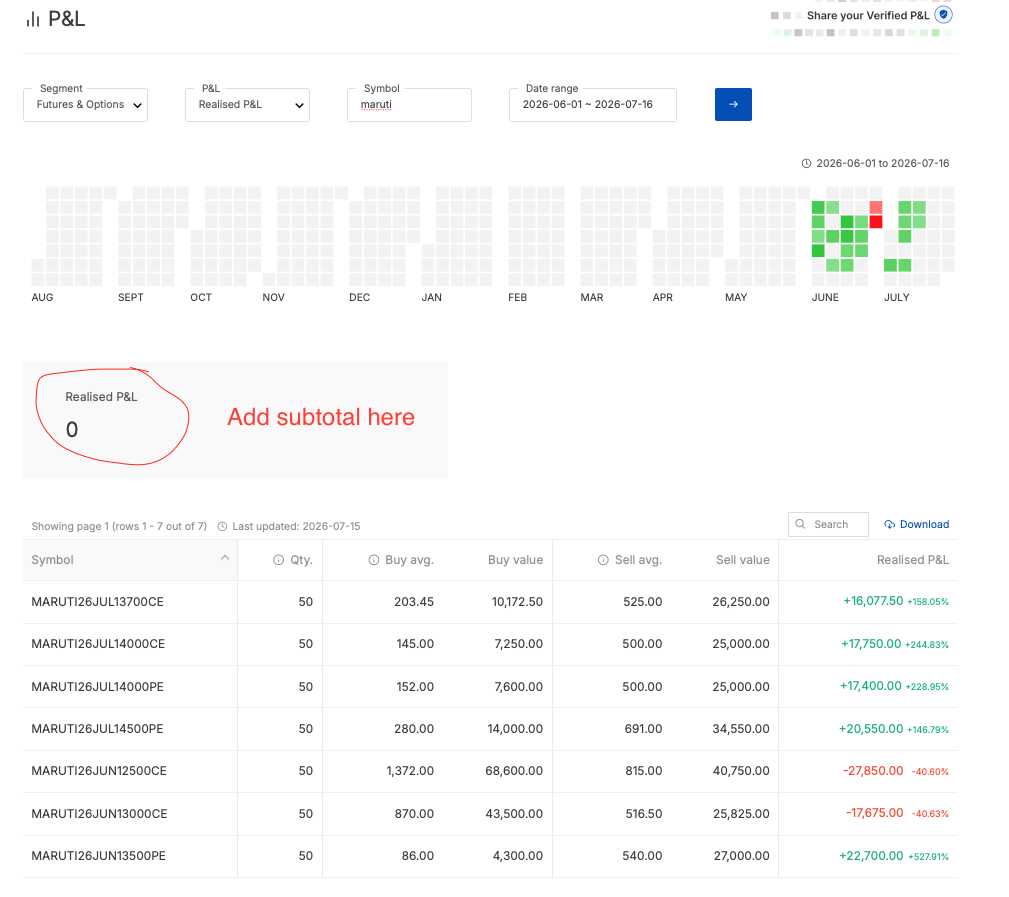
- In console, under the P&L section, please add SUBTOTAL along with additional filters. For eg, if I want to look up what I earned in a particular scrip, I have to manually add up all the trades.
Same for kite, sum total should be dynamically changed to subtotal upon filtering. (using search filter)
please introduce a collapse all/expand all button in kite web also just like in kite app.
if i have too many positions beyond a certain number of lines after grouping it wont show all the positions. have to manually collapse positions then only the last positions will start showing.
Also sorting by p&l & day p&l doesnt work when grouping by underlying is done. ideally it should be sort by each grouping instead it still tries to sort by individual line items instead of by groups.
I made an extension of my own
Did ask Z many months back, as usual no ETA🥲
Should I dm you the source code of ext ???
or you can just vibe code it using claude or codex
This doesn’t wrk ig
Do dm me if you need it
Made a new version which i use myself; has exp/coll all, max P , auto add position to watchlist etc
Not uploading here because idk Z policy on using ext on Z website
@dtyxg IIUC, such community contributions are fine.
It’s been done on this forum (and outside as well) for several years now.
(including what you yourself shared earlier in this thread in Feb)
Can someone from @Zerodha-Staff promptly chime-in to clarify this doubt?
Alongwith typical “do’s” and “don’ts” with such community contributions.
(eg. permissive license, no financial tall-claims/marketing/promises, no use of Zerodha logo/branding, no claims of being affiliated with Zerodha …)
1 Like
Hi @mynk
This is a known behaviour and will be addressed in a future update.
2 Likes
Hmmm… No concrete policy per se, but as long as works are genuine, not intended to mislead others in the community, or malicious in any other way, they may be shared here.
@dtyxg your extension sounds completely fine to share here. 
2 Likes