Dear Team Zerodha after using many others broker’s trading platform, I believe zerodha’s Kite is still the best trading platform in terms of Smooth clean User Interface, Usability and practicality.
Zerodha stick to its core values to avoid fooling the customer with gimmick/ fancy features like other broker does.
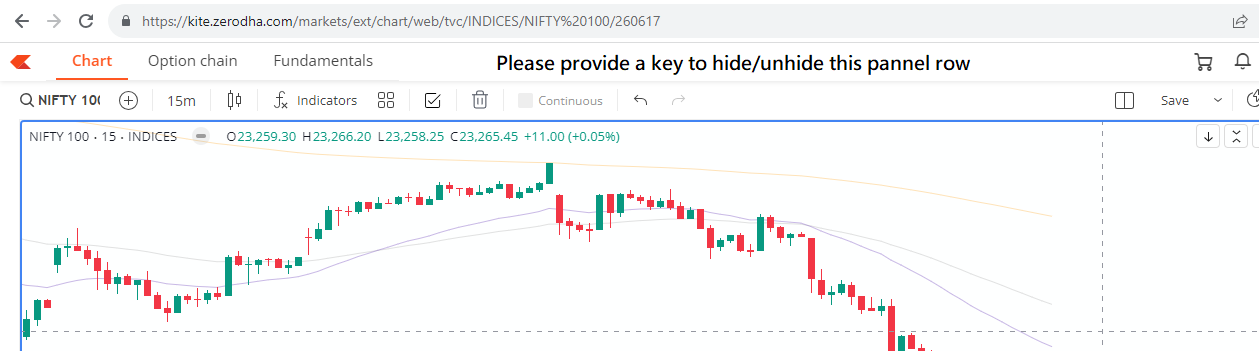
I’ve a suggestion for you team Please provide a switch to hide/unhide the upper panel row that lies below the address bar when we open the popout chart on a different tab. It will allow more wider charting window on the screen.
Similar to the hide switch that is available for the Drawing toolbar.
Hey @raviji, welcome to the community! and thanks for the kind words and for taking the time to share this suggestion.
We understand your point and the use case. The panel is kept there so you can quickly access things like the option chain, fundamentals, or the dashboard and more while viewing the chart, We’ve also tried to keep the panel compact so it does not take up much space on the screen.
That said, if you can DM us a few use cases where hiding the panel would be useful, we can take a look and see what we can do.
As I mentioned a key to hide/unhide the header panel will provide more space to view the chart. We want chart to be opened without any unnecessary header/ Left/ right toolbar.
Other broker also have different toolbar panel on their charting window but they provide a switch as well to hide them to view the chart with full space.
Whenever required we can unhide the panel with single click to access the tools of that particular panel.
Why it is difficult to provide a switch to hide a tool panel that unnecessarily captures charting space.
I’m less aware of technical difficulties in providing this feature But
As per user Interface point of view it doesn’t alter anyone experience, those who use that tool panel can continue to enable the panel as it is. But those who want full view of chart they can hide the panel with the help of switch provided.