Hi Team,
One usability issue I face in the Kite app Positions tab is that expiry dates are not visible for F&O positions.
For example, if I have 15-20 option/futures positions open, there is no quick way to identify which contract belongs to which expiry. Currently, I have to manually add symbols to the watchlist just to check their expiry dates, which becomes very painful and time-consuming.
It would be very helpful if the expiry date could be shown for symbols added in the Positions screen
This small addition would greatly improve usability for active traders managing multiple positions.
Thanks!
2 Likes
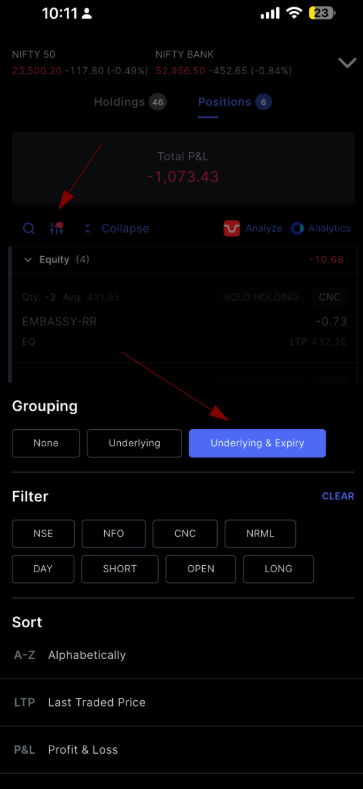
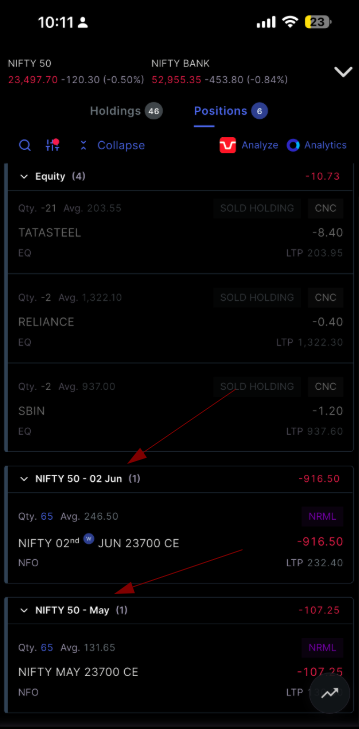
You can group your F&O positions by Underlying & Expiry on the Kite app — just like on the web. This makes it easier to identify and track contracts by their expiry dates. Tap the filter icon on the Positions screen to access this option. If you don’t see this option, please make sure your app is updated to the latest version from the App Store or Play Store. Please find the attachments given below.
1 Like
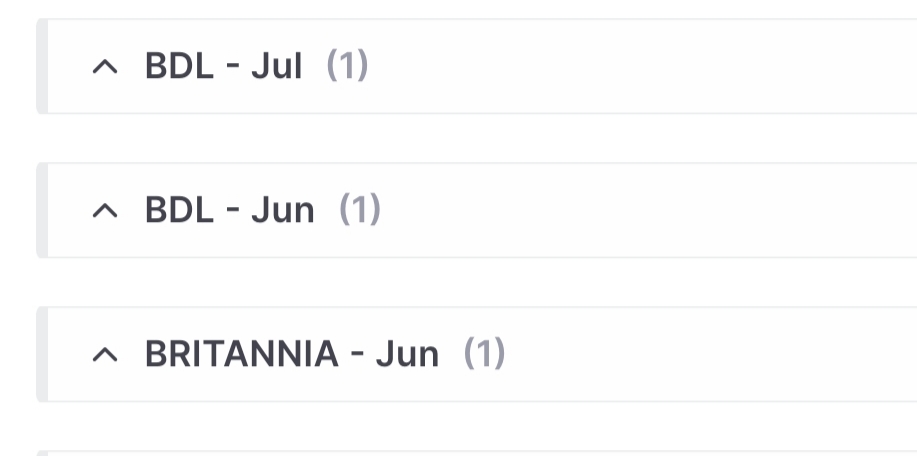
As per your reply, it appears to be working for index F&O contracts, but it is still not working for stock F&O positions.
Also, even in the screenshot you shared, monthly expiry contracts display only the month name rather than the actual expiry date. When managing multiple positions across different expiries, seeing only the month is not sufficient to quickly identify the exact contract.
Hi @Nitin_Sharma3, We’ve noted your suggestion to include the expiry date alongside the month for monthly contracts and will explore the feasibility of adding this