Hi Siva,
These were placed on 28/12/2020, i.e. last week. I have already called the support number but they do not seem to have any answer.
Next time you face you can post here, don’t think that is perfect hedge.
Can you point out why you think it is not a perfect hedge like an example? Because if the underlying goes way down there is put to protect you and if it goes up then there is no problem at all. And after I was able to place order the final margin shown is only blocked by NSE so I am pretty sure it is hedged.
I can’t see basket create button after creating 1st basket.
I have logged in from Chrome browser in mobile.
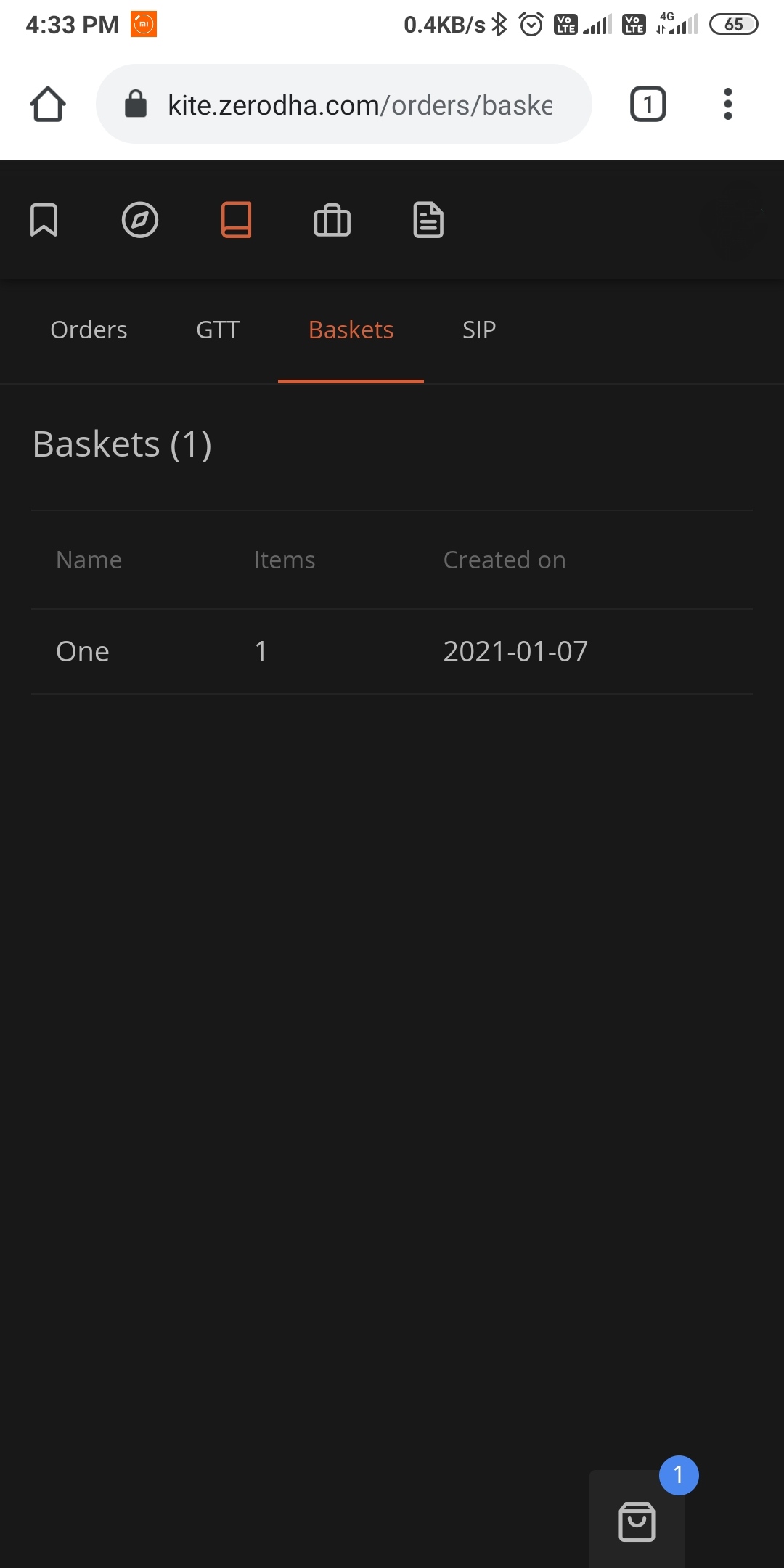
Will check on monday but would help if you can message me next time you face it again.
1 Like
Hi @siva-reddy,
Thanks for your help, I didn’t know we could message here  .
.
Will let you know if I face the similar issue. But can you once confirm if this particular basket works fine. That would be great. Because I want to place a large order and only thing holding me is this bug as I do not know the margin requirements and I don’t want to hold an unhedged position.
I will check on monday.
HI @siva-reddy, why you guys are not allowing to buy option outside the defined range in the basket if i am executing that option, buy with option sell position and also i have the required margins also ??
@siva-reddy @nithin let’s say nifty strike is at 14500. On expiry day, I created a basket and added sell orders at 14400PE, 14600CE. I also added SLM orders for the above positions. The sequence is buy-sell-buy-sell in the basket. The kite app shows req and final margin for this basket are less than the available funds. But when I executed the basket, the sell orders were rejected but the buy orders were pending to be triggered. The individual margins for the sell orders are more than the available funds. But since I added buy SLM orders for these why aren’t all orders executing even though req/final margin are available in my funds?? Please explain.
After sell order is executed and when stop loss is pending one can manually cancel pending orders so full margin is required to sell.
@siva I was hoping to reduce the margin for the sell orders by adding buy SLM orders. But I am still not able to execute sell orders with reduced margin. Even after adding SLM orders zerodha is asking for full margin for sell orders. Why is zerodha taking full margin even after adding SLM orders?? Is it possible to execute the sell orders with reduced margin instead of full margin given that exposure would be low owing to buy SLM orders??
Not possible to have reduced margin, not only zerodha all the brokers do the same, please read my above comment.
@siva-reddy Thanks for the clarification. I just don’t understand why full margin is required when exposure is low because of buy SLM order. Could you please explain why this is the case with all the brokers?? Does zerodha have any plans in implementing the following feature??
-
The user should be able to sell with reduced margins when there is a buy SLM.
-
The user can change the buy order but cannot cancel it until the sell position is squared off.
-
The user should have an option to change the trigger price for buy order based on the availability of funds.
It will be really awesome if this happens. I believe this feature would add great value to zerodha and super helpful for small traders like me.
This is not possible, exchange won’t allow margin benefit for this, it’s not us who can decide on margins, we just ask what is required.
2 Likes
even i feel this is a very important feature…request @nithin @siva-reddy if this can be implemented soon…thanks a lot.
1 Like
Will check on possibility.
@siva-reddy anything can be implemented even within the given rules set by SEBI. Just lock the orders, its a ‘basket order’, make it not changeable once put to execution.
Even we do the same, but one by one, but its really cumbersome to do so in kite. If the ‘basket_lock’ can do it, will be great. We still obey rules and also use margins effectively. (basket with hedges)
I have lost more money due to these restrictions which 90% of the time doesnt allow my trade execution order and multi-order-unfriendly interfaces in kite (pi and all never ever worked, nest was the best).
2 Likes
You can now share a basket order you’ve created on Kite by exporting the basket and sharing the generated file with your friend. Your friend will be able to use the file to import the basket. You can check how to export and import a basket below.
Export basket
- Go to Orders>Baskets>Options and click on edit
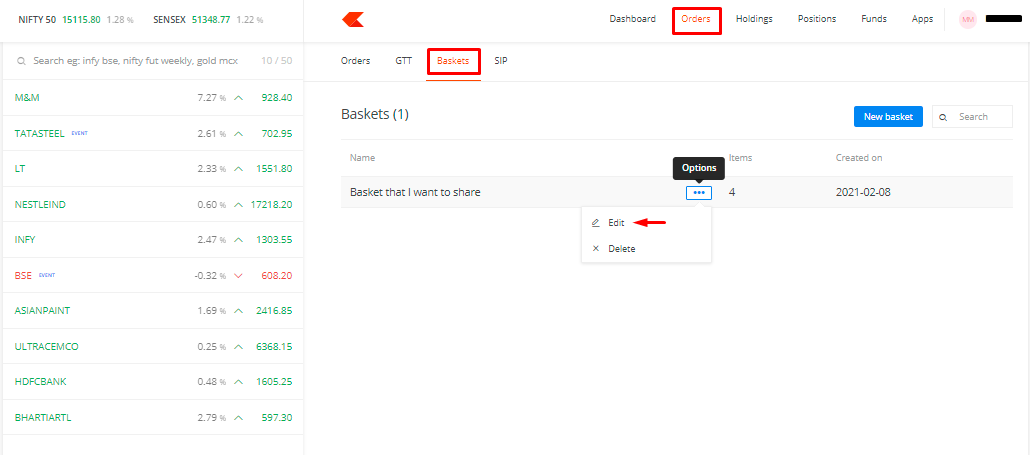
- Select the ‘Export basket’ option
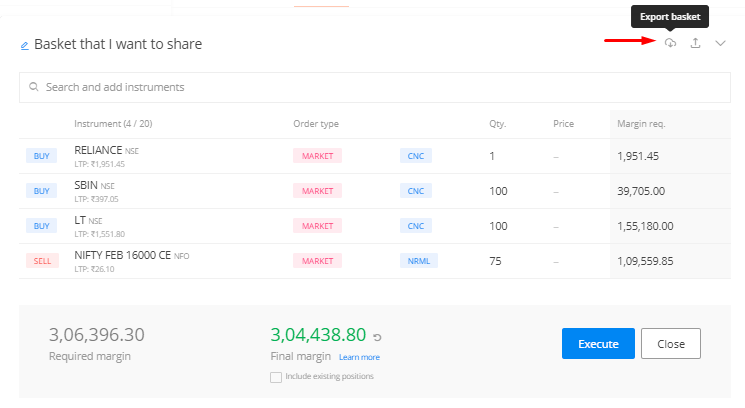
A file with the name of your basket will be downloaded in .JSON format.
Import basket
- Go to Orders>Baskets and select ‘New basket’
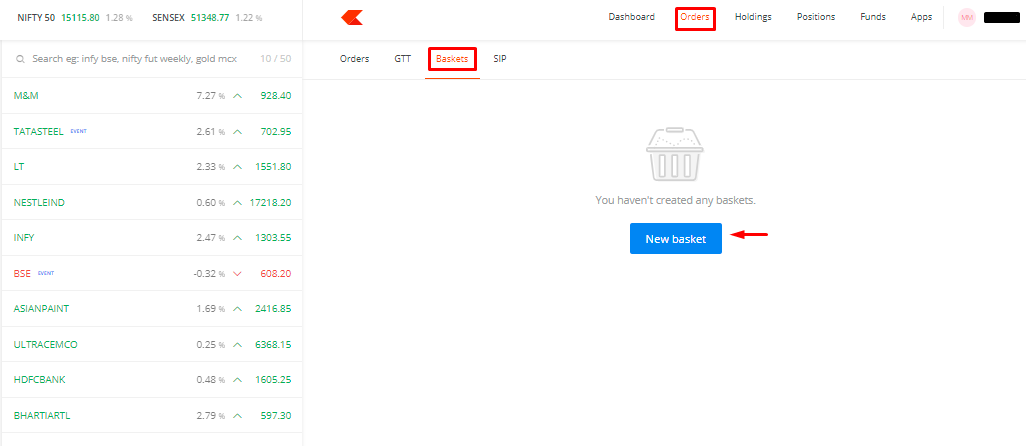
- Select the Import basket option
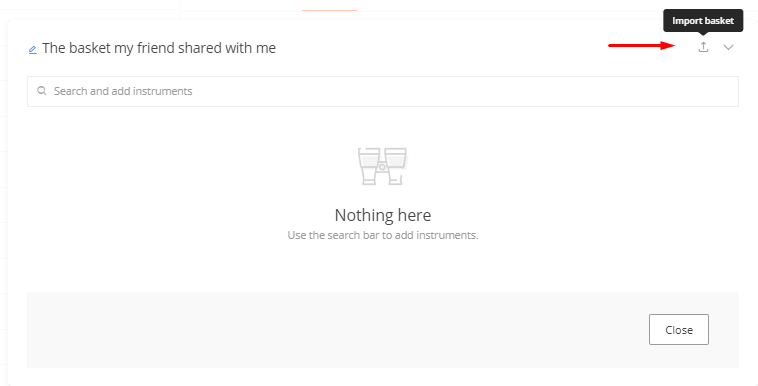
The imported basket will be saved automatically once you import it. You can edit the basket or execute it as is.
5 Likes
Hi @siva-reddy, @ShubhS9,
I have a bunch of holdings in CNC mode. If I want to sell part of these holdings, can I create a basket of these shares for sell order to exit these part holdings or does the basket order is treated as a fresh short order. Currently exiting holdings one by one for lot of them is painful at times.