New Features and Updates on Coin - Mutual Funds

Coin App - Version 2.7.2 (220)

UPI Autopay is a payment mechanism that automatically makes payments for SIPs from the bank account, similar to a nach mandate. UPI Autopay is now live on the Coin app. You can now easily automate your SIPs on Coin using UPI Autopay.

To setup UPI autopay on Coin APP:

  • Login to Coin App.
  • Tap on Account.
  • Under Payments, tap on Mandates.
  • Tap on Create Mandate.
  • Enter the Mandate Name
  • Tap on Using Coin UPI
  • Tap on Proceed, then click on Confirm Autopay and pay ₹1
  • Enter your UPI pin and submit

Once the UPI Autopay request is authorized on the UPI app, ₹1 will be debited from the bank account and credited back within T+3 working days.

You can check the status in your UPI app and the Mandates section on Coin.

The mandate will be activated within 5-10 minutes on Coin, after which you can create a new SIP or link an existing SIP to the mandate.
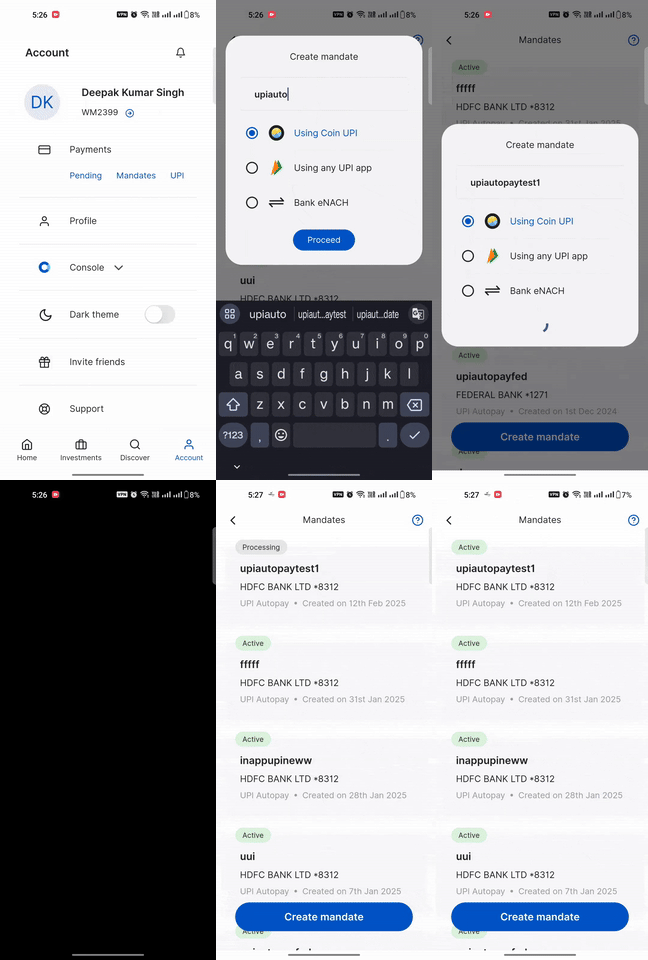
11-ezgif-ezgif.com-video-to-gif-converter

Create a new SIP with the UPI autopay:

  • Tap on Discover
  • Search for the mutual fund using the universal search bar
  • Click on SIP
  • Click on Mandate and select a UPI Autopay from the dropdown
  • Enter the amount and frequency, then tap on Create SIP and Confirm
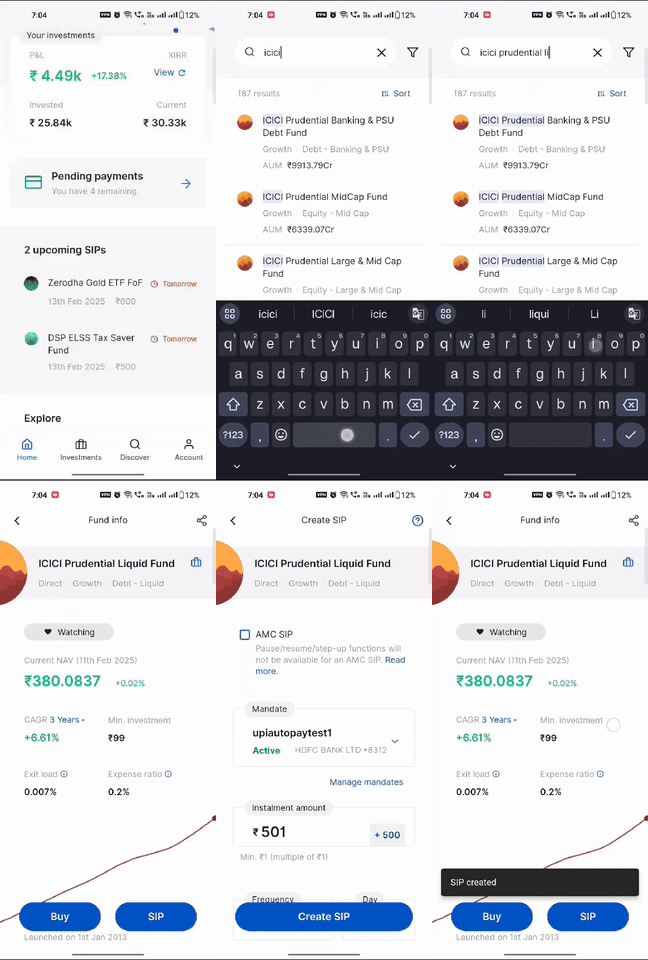
2-ezgif.com-video-to-gif-converter

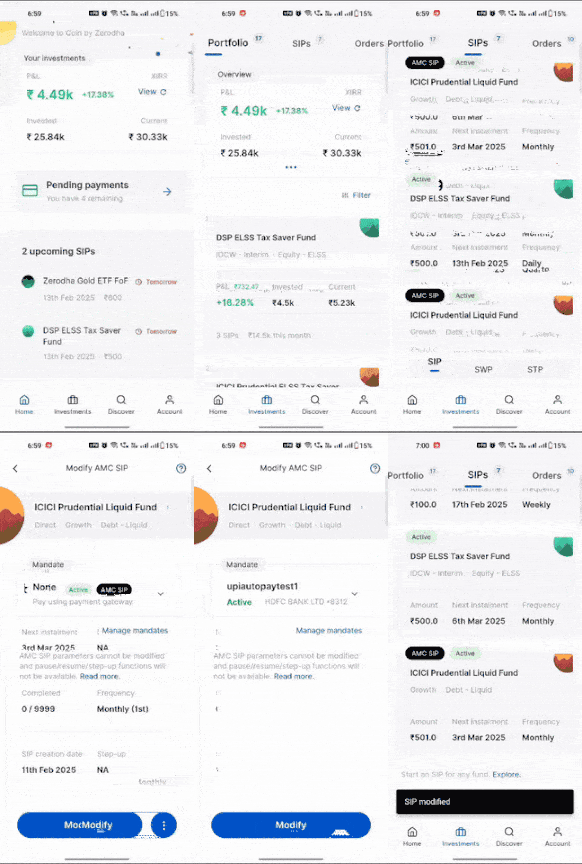
To link existing SIP to UPI Autopay:

  • Tap on Investments, then go to SIPs
  • Click on SIP, you want to link with UPI Autopay
  • Tap on Modify SIP.
  • Click on Mandates, select a mandate from the dropdown
  • Tap Modify SIP, then click on Modify

Pi7_GIF_CMP

How UPI Autopay SIP debit works:

A debit request for UPI Autopay is triggered from Zerodha on the morning of T-minus-1 day (one day before the SIP due date) and sent to the payment gateway. You will receive a notification about the upcoming debit.

On the SIP date, the specified amount is debited from your bank account between 6:30 and 7:00 AM, and a request is sent to the Indian Clearing Corporation Limited (ICCL).

The maximum daily limit for UPI autopay is ₹1 lakh, including UPI transactions. UPI autopay can be set up using primary or secondary bank accounts, but not current accounts.


Daily SIP on Coin App is Live

We have launched the Daily SIP feature on the Coin app, allowing users to create sip in mutual funds for Daily frequency, including weekends (Saturday and Sunday).

A daily SIP lets you invest a fixed amount each day. This helps average out the cost of units and take advantage of market fluctuations. It promotes disciplined, regular investing and offers the potential for better compounding returns over time.

To create a SIP on the Coin app, follow these steps:

  • Tap on Discover
  • Search for the mutual fund using the universal search bar
  • Click on SIP
  • Enter the amount
  • Select Frequency as Daily
  • Click Create SIP and Confirm

4-ezgif.com-video-to-gif-converter

A daily SIP can be linked to either an NACH mandate or a UPI Autopay for seamless payment on the due date. If an SIP is linked to an NACH mandate, the funds will be debited from the bank account on T+2 days, and in the case of UPI Autopay, the funds will be debited on T+1 day from the SIP trigger date.

2 Likes

@Deepak_Kumar_Singh i love the daily sip in UPI - good work in coin platform

3 Likes

Coin Update

We have expanded payment options on Coin to allow transactions from all the banks linked to your Zerodha account. This provides flexibility while investing in mutual funds.

Earlier, the purchase of mutual fund was through primary bank account. Now, you can seamlessly make payments using any linked bank account, whether it’s primary, secondary, or tertiary bank.

WhatsAppVideo2025-03-29at11.11.02AM-ezgif.com-video-to-gif-converter (1) (1)

10 Likes

Is Coin mobile app used more than Coin Web? Any data on this?

1 Like

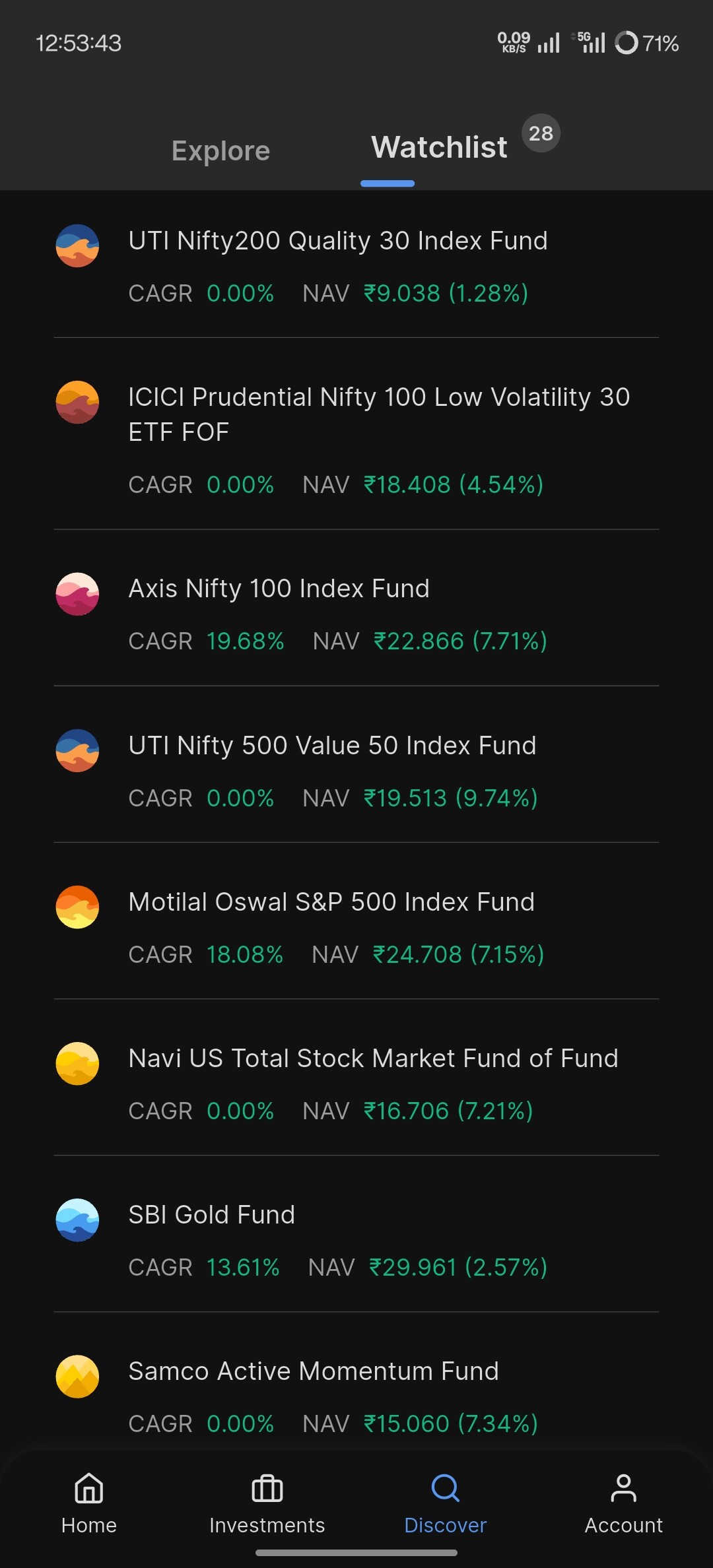
The watchlist is very rudimentary. It only shows cagr in case of funds that are 5 year old. So most of the funds are blank and show 0%. It also doesn’t allow sorting.

  1. There should be an option to show 1/2/3/4/5 year cagr in the main view and the selection should stick unless changed by the user
  2. There should be an option to sort the funds by the said selection method. The funds not qualifying with enough data should be at the bottom. Rest should be sorted based on the selected time period.

@Neelesh @Deepak_Kumar_Singh
@nithin

2 Likes

We have a few modifications lined up for the watchlist, will be taken up in the future builds. Thanks for the feedback.

For all the talk about - we are rolling out features slowly because we want to build right the first time - the FD investment option was launched and rolled back.

Now Zerodha is neither building it fast nor building it right?

4 Likes

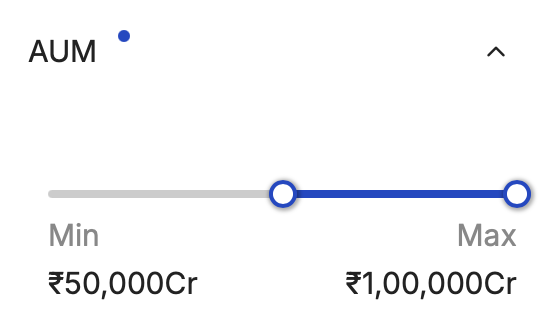
Hi folks Parag Parikh flexi cap fund has crossed 100k Cr AUM, so it gets filtered out in Coin when you apply the AUM filter. @Neelesh

PPFAS is suffering from success :laughing:

Screenshot 2025-07-25 at 12.26.45 PM

3 Likes

On app it takes the higher correct value, we we will update it shortly on web.

Team

Can you able to add this feature how much profit or loss chart on daily update of we invest. Not profit booking return earned

Please confirm if you want to see day-wise unrealised P&L figures for mutual funds investments?

Yes, we can see particular date profit on chart, likewise NAV chart

When we expect in coin to add external funds and manage??

@Neelesh , @Arockiya_Raja If I select Mutual funds on kite, and click on “ADD”, it redirects to coin page, but ask for login again. The issue doesn’t persist in web browser,it just open another Tab for coin and you can do the stuff.

When you click on console links( portfolio, p&l etc)given on kite mobile app, it directly enters console. No login required.

In kite mobile app, can we do the changes so that it logins to Coin automatically similar to console. ??

Are you clicking the mutual fund scheme name from the Marketwatch search? Login is working for the redirect. Could you create a ticket and DM the ticket number to assist?

From marketwatch it works. From holding page it doesn’t work. Will raise a ticket

Got it, I will check this.

Any update on this?

is this coming?

1 Like

@Arockiya_Raja
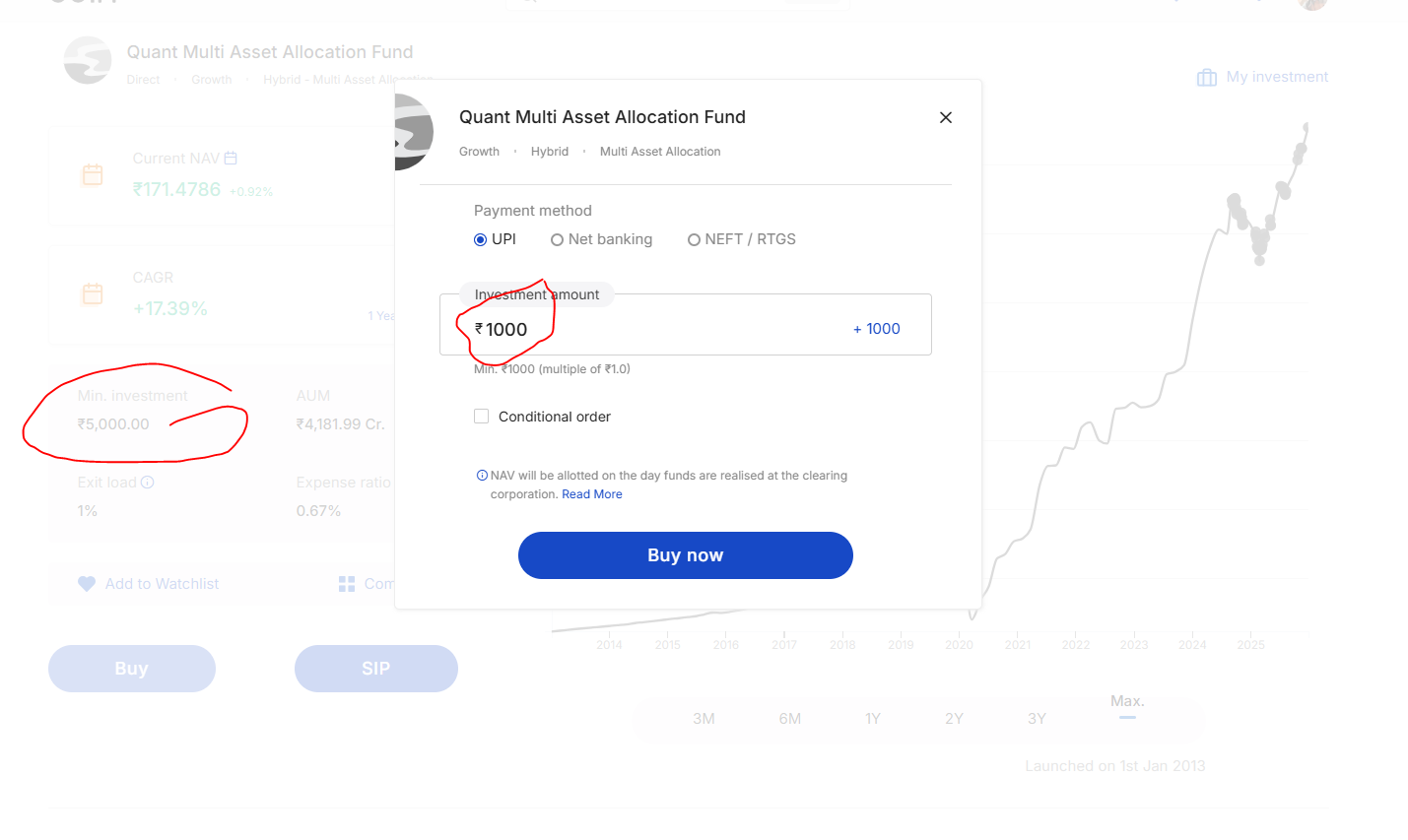
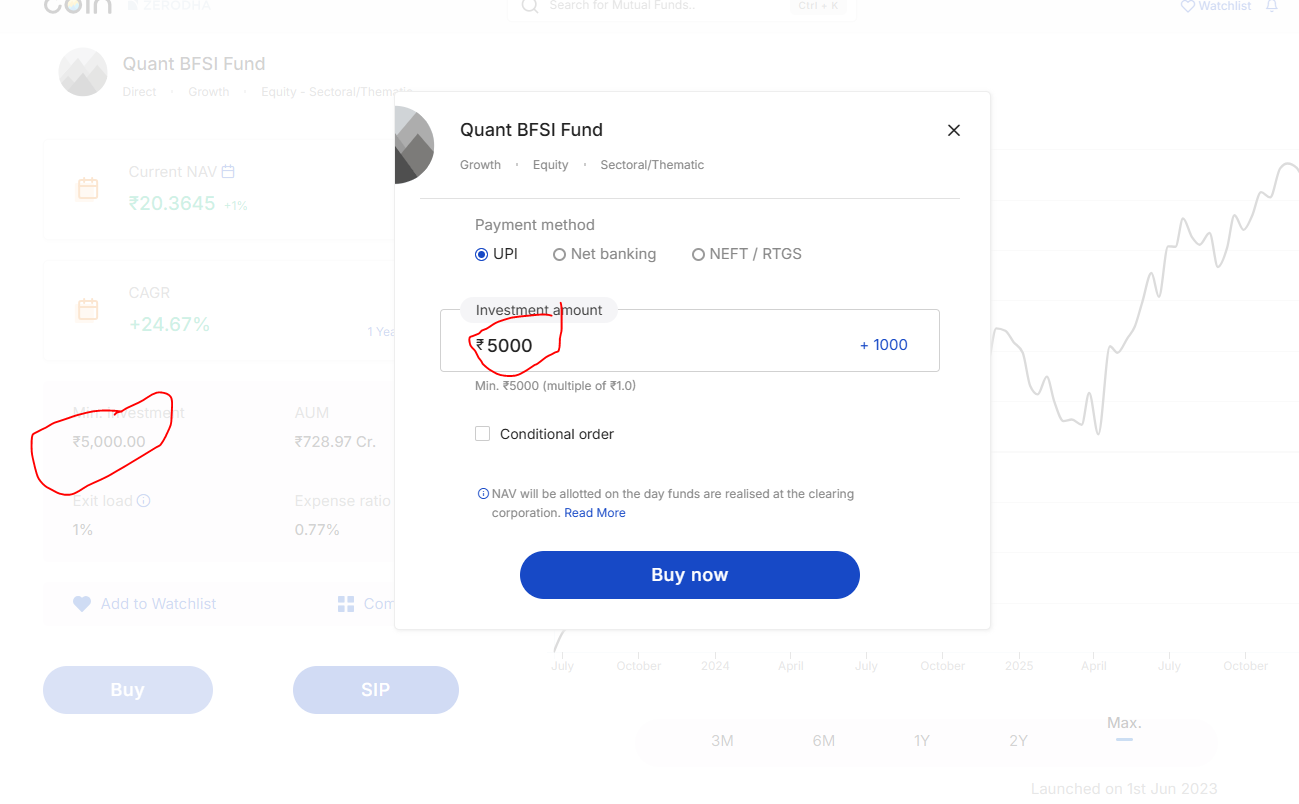
i invested in Quant Multi asset , and quant BFSI - both have min investment 5000, additional investment is 1000

but quant BFSI is asking additional investment also 5000 , please check that one